전체 글 29

태블로 specialist 시험 모의고사

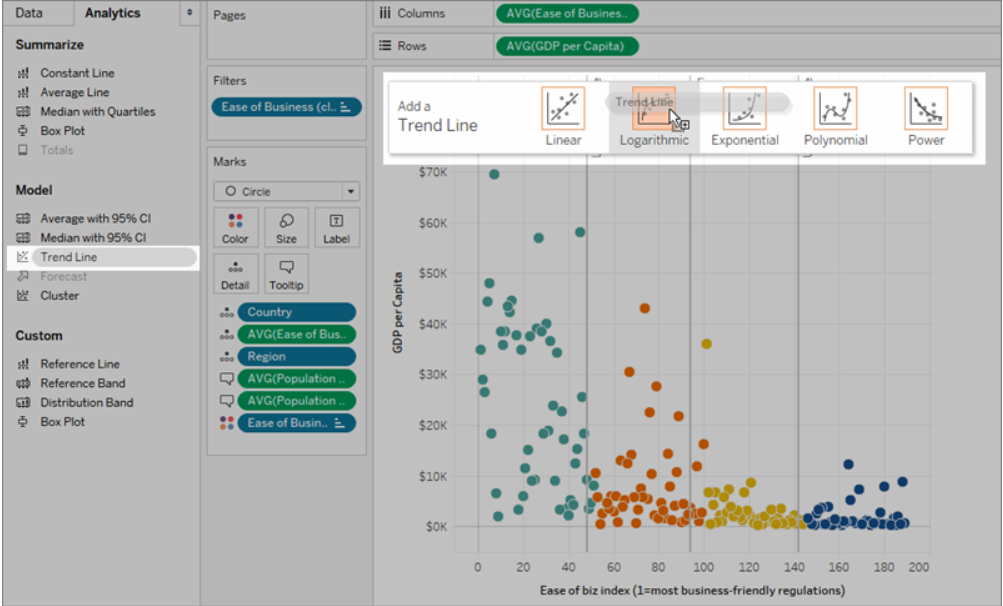
What types of trend lines are available in Tableau? [Select All that Apply] a) logistic b) Linear c) Logarithmic d) Multinomial e) Polynomial 더보기 Correct answer: b, c, e The available trend line models that are used in Tableau are – Linear(선형), Logarithmic(로그), Exponential(지수) and Polynomial(다항식) and Power(거듭제곱) What steps should be taken to create a geographical hierarchy? a) In the Analytics p..
태블로 Desktop specialist Domain 2: Exploring and Analyzing Data

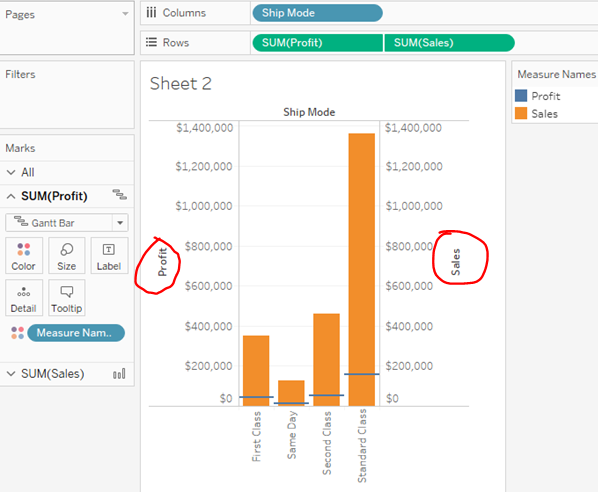
Domain 2: Exploring and Analyzing Data 2.1 Create basic charts 2.1.1 Create a bar chart 2.1.2 Create a line chart 2.1.3 Create a scatterplot trend line : linear(선형), Logarithmic(로그), Exponential(지수), Polynomial(다항식), Power(거듭제곱) 2.1.4 Create a map using geographic data Steps of geographical hierarchy In the Data Pane Right-click the geo field → Hierarchy → Create Hierarchy 2.1.5 Create a combine..

Tableau Desktop Specialist Practice Questions on Domain 1: Connecting to & Preparing Data

How can the users refresh an extract immediately in Tableau desktop? (Multiple Possible Answers) a) Select a Data Source on Data Menu -> Extract b) Select a Data Source on Data Menu -> Extract -> Refresh c) Sign in to Tableau Server -> Click Tasks at the top of the page -> Under Extract Refreshes select the workbook or data source -> On the Actions menu click Run now. d) Select a Data Source on ..

태블로 데스크탑 자격증 문제

What are two methods for renaming a field in a visualization? (Choose two.) A. From the Data pane, use the field’s drop-down menu and select Rename. B. From the Data pane, right-click the field and select Replace References. C. From the Data pane, click and hold on the field until the name is editable. D. From the Format menu, select Field Labels. 더보기 정답 : AC renaming 방법 : 드롭다운 or click and hold..

Tableau Desktop Specialist - Domain1. Connecting to and Preparing Data

Domain 1: Connecting to and Preparing Data 데이터 연결 및 준비 더보기 1.1 Create live connections and extracts 1.1.1 Create a live connection to a data source 1.1.2 Explain the differences between using live connections versus extracts 1.1.3 Create an extract 1.1.4 Save metadata properties in a .TDS 1.1.5 Create a data source that uses multiple connections 1.2 Create and manage the data model 1.2.1 Add rel..

태블로 데스크탑 자격증 소개 Tableau Desktop Specialist Certification

태블로 자격증이란? 태블로 자격증은 데이터 시각화 도구인 태블로(Tableau)를 사용하는 능력을 검증하는 시험입니다. 태블로 자격증의 종류 태블로 자격증에는 Desktop Specialist, Desktop Certified Associate, Desktop Certified Professional, Server Certified Associate, Server Certified Professional 등 다양한 종류가 있습니다. 일반적으로 Desktop Specialist를 많이 취득하는 것으로 알고 있고 저도 이 자격증을 준비하고 있어요. 태블로 자격증을 보유하면 데이터 시각화에 대한 전문성을 인증받을 수 있으며, 취업에도 큰 도움이 됩니다. 태블로 데스크탑 Specialist 시험 소개 Numbe..

rename 메서드

# ============================================================================= # rename 메서드 # ============================================================================= # - index object(index, columns)의 일부의 수정 가능하게 하는 메서드 # - pandas 제공 # - axis로 방향 전달(0(default):index rename, 1:column rename) df2.rename(mapper, # mapping object(dict => {old:new}) axis=0) # 수정할 방향 df2.rename({'2013년':'2022년'}..

isin, isnull, astype, index 등을 이용한 실습

# 1. student.csv, exam_01.csv 파일을 읽고 std = pd.read_csv('student.csv', encoding='cp949') exam = pd.read_csv('exam_01.csv', encoding='cp949') # 1) 1,2학년 학생의 몸무게의 평균 출력 (std['GRADE'] == 1) | (std['GRADE'] == 2) # 비교연산자를 사용한 표현 방식 std['GRADE'].isin([1,2]) # in연산자를 사용한 표현 방식 std.loc[std['GRADE'].isin([1,2]), 'WEIGHT'].mean() # 2) DEPTNO 컬럼을 생성하여 학과번호를 쓰되, # 제2전공명이 없으면 제1전공번호를, 있으면 제2전공번호로 std['DEPTNO..

영화 유튜브 영상 주소와 조회수 크롤링

pip install selenium from selenium import webdriver from webdriver_manager.chrome import ChromeDriverManager from selenium.webdriver.common.keys import Keys from bs4 import BeautifulSoup as bs import pandas as pd import time import random def scroll(): try: # 페이지 내 스크롤 높이 받아오기 last_page_height = driver.execute_script("return document.documentElement.scrollHeight") while True: # 임의의 페이지 로딩 시간 설정 ..